
HP Scripting Toolkit 9.10 for Linux User Guide
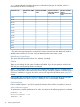
Table Of Contents
- HP Scripting Toolkit for Linux User Guide
- Contents
- 1 Introduction
- 2 Deployment using the Scripting Toolkit
- 3 Booting and OS installation
- 4 Scripting Toolkit utilities
- Native package formats
- Syntax conventions
- Utility online help
- Using Scripting Toolkit utilities
- Using REBOOT
- Using SETBOOTORDER
- Using STATEMGR
- Using RBSURESET
- Using BOOTEXTRACT
- Using HPDISCOVERY
- Using IFHW
- Using HWQUERY
- Using CONREP
- CONREP command-line syntax
- CONREP command line arguments
- CONREP return codes
- CONREP screen output
- CONREP -s (Store to Data file) Example usage for HP ProLiant servers not using the Oxx ROM family
- CONREP –l (Load from Data File) Example Usage for HP ProLiant servers not using the Oxx ROM family
- CONREP Data File Sample Contents for HP ProLiant servers not using the Oxx ROM family
- CONREP command file contents for HP ProLiant servers not using the Oxx ROM family
- Using HPRCU
- Using HPACUSCRIPTING
- Using HPLPCFG
- Using LO100CFG
- Using HPQLAREP
- Using HPONCFG
- 5 Troubleshooting
- 6 Support and other resources
- 7 Documentation feedback
- Acronyms and abbreviations
- Index
• WWN [N]—Configure the external controller that has the World Wide Name N.
• SerialNumber [N]—Configure the shared storage controller that has serial number N.
• IOCabinet[N],IOBay[N],IOChassis[N],Slot[N],Cabinet[N],Cell[N]—Configure
the controller in the Integrity server that has the slot path information defined by this sequence
of identifiers.
ChassisName
Enter the user-defined character string that identifies the controller. Any of the following characters
can be used in the string:
a–z, A–Z, 0–9, !, @, #, *, (, ), ,, -, _, +, :, ., /, [space]
You do not need to use quotation marks around the string, but doing so allows the string to begin
with a space character. However, the string cannot end with a space character.
Currently, only shared-storage controllers such as the RA4x00, MSA1000, and Smart Array Cluster
Storage support the ChassisName option. The RA4x00 controller uses a 24-character string, while
other applicable controllers use a 20-character string.
ClearConfigurationWithDataLoss
This command is now deprecated.
The default value for this option is No. Clearing the configuration causes data loss because it
deletes all logical volumes and arrays on the controller. If you clear a configuration, you can write
commands later in the script file to create a new configuration from the liberated drive capacity.
LicenseKey, DeleteLicenseKey
These options enable you to enter a 25-character license key to activate or uninstall some controller
features. Hyphens can be entered, but are not required.
PreferredPathMode
The setting that you select for this option determines how the preferred I/O path to a particular
logical drive is set for a redundant array controller that is in an active/active configuration.
Not all controllers support this feature, and controllers in an active/standby configuration disregard
this option.
• Auto is the default setting for new configurations. In this case, the storage system automatically
selects the I/O path from the redundant controller to the logical drive and dynamically load
balances all paths.
• Manual enables you to assign the logical drive to a specific redundant controller. If you select
this setting, use the
PreferredPath
command to specify the path.
If you are reconfiguring a controller and do not specify a setting for this option, the existing setting
remains unchanged.
ReadCache, WriteCache
Enter a number between 0 and 100 to specify the percentage of cache that is to be allocated to
drive reads or writes. The default value for both options is 50.
The allowable cache ratios depend on the controller model and whether it has battery-backed
write cache, as described in the following table.
Using HPACUSCRIPTING 41