
HP Scripting Toolkit 9.10 for Linux User Guide
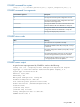
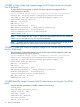

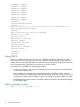
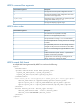
Table Of Contents
- HP Scripting Toolkit for Linux User Guide
- Contents
- 1 Introduction
- 2 Deployment using the Scripting Toolkit
- 3 Booting and OS installation
- 4 Scripting Toolkit utilities
- Native package formats
- Syntax conventions
- Utility online help
- Using Scripting Toolkit utilities
- Using REBOOT
- Using SETBOOTORDER
- Using STATEMGR
- Using RBSURESET
- Using BOOTEXTRACT
- Using HPDISCOVERY
- Using IFHW
- Using HWQUERY
- Using CONREP
- CONREP command-line syntax
- CONREP command line arguments
- CONREP return codes
- CONREP screen output
- CONREP -s (Store to Data file) Example usage for HP ProLiant servers not using the Oxx ROM family
- CONREP –l (Load from Data File) Example Usage for HP ProLiant servers not using the Oxx ROM family
- CONREP Data File Sample Contents for HP ProLiant servers not using the Oxx ROM family
- CONREP command file contents for HP ProLiant servers not using the Oxx ROM family
- Using HPRCU
- Using HPACUSCRIPTING
- Using HPLPCFG
- Using LO100CFG
- Using HPQLAREP
- Using HPONCFG
- 5 Troubleshooting
- 6 Support and other resources
- 7 Documentation feedback
- Acronyms and abbreviations
- Index

HPRCU command line arguments
DescriptionCommand line argument
This argument saves the system configuration to a file.
-s
This argument loads the system configuration from a file
and writes it to the target server.
-l
Name of the input or output file. If not specified, the XML
configuration defaults to hprcu.xml.
-f{file.xml}
This argument displays program usage.
-h
HPRCU return codes
DescriptionCommand line argument
The command was completed successfully.0
The server is not supported by this utility.1
The input XML file is missing or is in an invalid format.2
One of the dependencies is missing. See the error message
for details.
3
The system RBSU password is set. The settings cannot be
changed until the password is cleared from within RBSU.
4
An error occurred reading the supported features on the
server.
5
Invalid command line syntax. Use the -h parameter for
complete command line parameters.
6
A general error occurred saving or loading the server
settings. See the error message for details.
7
HPRCU sample XML format
A sample XML format generated by HPRCU is similar to the following:
<hprcu>
<informational>
<product name>ProLiant DL380 Gen8</product_name>
<system_rom_family>P64</ system_rom_family >
<system_rom_date>11/01/2011</system_rom_date>
</informational>
<feature feature_id='176' selected_option_id='2' default_option_id=’1’ feature_type='option'>
<feature_name>Intel(R) Hyperthreading Options</feature_name>
<option option_id='1'><option_name>Enabled</option_name></option>
<option option_id='2'><option_name>Disabled</option_name></option>
</feature>
<feature feature_id='100' feature_type=’string’>
<feature_name>Server Name - Line 1</feature_name>
<feature_value>SERVERNAME</feature_value>
</feature>
</hprcu>
Using HPRCU 35