
HP Scripting Toolkit 9.10 for Linux User Guide
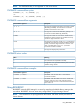
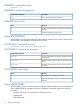
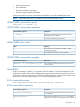
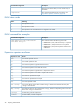

Table Of Contents
- HP Scripting Toolkit for Linux User Guide
- Contents
- 1 Introduction
- 2 Deployment using the Scripting Toolkit
- 3 Booting and OS installation
- 4 Scripting Toolkit utilities
- Native package formats
- Syntax conventions
- Utility online help
- Using Scripting Toolkit utilities
- Using REBOOT
- Using SETBOOTORDER
- Using STATEMGR
- Using RBSURESET
- Using BOOTEXTRACT
- Using HPDISCOVERY
- Using IFHW
- Using HWQUERY
- Using CONREP
- CONREP command-line syntax
- CONREP command line arguments
- CONREP return codes
- CONREP screen output
- CONREP -s (Store to Data file) Example usage for HP ProLiant servers not using the Oxx ROM family
- CONREP –l (Load from Data File) Example Usage for HP ProLiant servers not using the Oxx ROM family
- CONREP Data File Sample Contents for HP ProLiant servers not using the Oxx ROM family
- CONREP command file contents for HP ProLiant servers not using the Oxx ROM family
- Using HPRCU
- Using HPACUSCRIPTING
- Using HPLPCFG
- Using LO100CFG
- Using HPQLAREP
- Using HPONCFG
- 5 Troubleshooting
- 6 Support and other resources
- 7 Documentation feedback
- Acronyms and abbreviations
- Index

RBSURESET command-line syntax
rbsureset [/?]
RBSURESET command-line arguments
DescriptionCommand-line argument
This argument displays help information.
[/?]
RBSURESET return codes
MeaningValue
The BIOS settings have been successfully reset to the factory
default.
0
The BIOS settings have not been reset.
1
Using BOOTEXTRACT
BOOTEXTRACT is used to extract the boot sector files from Windows Server 2003. These files can
be used later in the installation of Windows Server 2003.
BOOTEXTRACT command-line syntax
bootextract [ufat.dll][ntldr.bss][ntldr2.bss]
BOOTEXTRACT command-line arguments
DescriptionCommand-line argument
Full path to the ufat.dll (from Windows 2003) file to extract
the boot sector
ufat.dll
Full path to the output file to save the first part of the boot
sector
ntldr.bss
Full path to the output file to save the second part of the
boot sector
ntldr2.bss
BOOTEXTRACT return codes
MeaningValue
The command was completed successfully.
0
Any non-0 return code is an error. For details, see the error
message.
n
Using HPDISCOVERY
HPDISCOVERY provides an inventory of the server being configured and must run on each deployed
server. HPDISCOVERY is executed by the server configuration script and captures the following
information:
• System ID (This field is not supported on 100 series servers)
• System name
• ROM information
26 Scripting Toolkit utilities