
HP Scripting Toolkit 9.10 for Linux User Guide
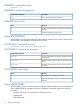
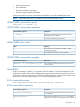
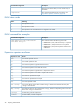

Table Of Contents
- HP Scripting Toolkit for Linux User Guide
- Contents
- 1 Introduction
- 2 Deployment using the Scripting Toolkit
- 3 Booting and OS installation
- 4 Scripting Toolkit utilities
- Native package formats
- Syntax conventions
- Utility online help
- Using Scripting Toolkit utilities
- Using REBOOT
- Using SETBOOTORDER
- Using STATEMGR
- Using RBSURESET
- Using BOOTEXTRACT
- Using HPDISCOVERY
- Using IFHW
- Using HWQUERY
- Using CONREP
- CONREP command-line syntax
- CONREP command line arguments
- CONREP return codes
- CONREP screen output
- CONREP -s (Store to Data file) Example usage for HP ProLiant servers not using the Oxx ROM family
- CONREP –l (Load from Data File) Example Usage for HP ProLiant servers not using the Oxx ROM family
- CONREP Data File Sample Contents for HP ProLiant servers not using the Oxx ROM family
- CONREP command file contents for HP ProLiant servers not using the Oxx ROM family
- Using HPRCU
- Using HPACUSCRIPTING
- Using HPLPCFG
- Using LO100CFG
- Using HPQLAREP
- Using HPONCFG
- 5 Troubleshooting
- 6 Support and other resources
- 7 Documentation feedback
- Acronyms and abbreviations
- Index

NOTE: The STATEMGR utility is not supported on 100 series servers.
STATEMGR command-line syntax
STATEMGR [/R | -R] [EVNAME] [/?]
- or -
STATEMGR [/W | -W] [EVNAME] [VALUE] [/?]
STATEMGR command-line arguments
DescriptionCommand-line argument
This argument reads the state of the environment variable
defined by [EVNAME]. The value of the environment
variable is returned as a return code.
/R or –R
This argument writes the state defined by [VALUE] to an
environment variable defined by [EVNAME].
/W or -W
This argument creates an environment variable used to
represent the state to manage. The variable can be any
word that is eight characters or fewer.
EVNAME
This argument is used only with the /W or -W arguments to
indicate the value of the environment variable to maintain.
VALUE
[VALUE] is limited to integers between 0 and 254. If no
value is provided when using /W or -W, the state
environment variable is cleared.
This argument displays help information.
/?
STATEMGR return codes
MeaningValue
The command was completed successfully.
0
N arguments were ignored because they were not in the
variable=<string> format.
n
STATEMGR command-line examples
DescriptionCommand-line argument
STATEMGR writes the state value 3 to the PHASE
environment variable.
STATEMGR /W PHASE 3
STATEMGR reads the PHASE environment variable and
returns its value as a return code. If the environment
STATEMGR /R PHASE
variable has been reset or no value has been stored, the
return code is 0.
Using RBSURESET
RBSURESET resets the BIOS settings for a server by reapplying the default factory setting at the
next reboot. RBSURESET does not erase array configurations or logical storage volumes.
NOTE: This command is not yet supported on HP ProLiant 100 series servers, but will be in
futures releases.
Using RBSURESET 25