
HP Scripting Toolkit 9.10 for Linux User Guide
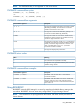
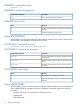
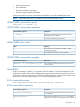

Table Of Contents
- HP Scripting Toolkit for Linux User Guide
- Contents
- 1 Introduction
- 2 Deployment using the Scripting Toolkit
- 3 Booting and OS installation
- 4 Scripting Toolkit utilities
- Native package formats
- Syntax conventions
- Utility online help
- Using Scripting Toolkit utilities
- Using REBOOT
- Using SETBOOTORDER
- Using STATEMGR
- Using RBSURESET
- Using BOOTEXTRACT
- Using HPDISCOVERY
- Using IFHW
- Using HWQUERY
- Using CONREP
- CONREP command-line syntax
- CONREP command line arguments
- CONREP return codes
- CONREP screen output
- CONREP -s (Store to Data file) Example usage for HP ProLiant servers not using the Oxx ROM family
- CONREP –l (Load from Data File) Example Usage for HP ProLiant servers not using the Oxx ROM family
- CONREP Data File Sample Contents for HP ProLiant servers not using the Oxx ROM family
- CONREP command file contents for HP ProLiant servers not using the Oxx ROM family
- Using HPRCU
- Using HPACUSCRIPTING
- Using HPLPCFG
- Using LO100CFG
- Using HPQLAREP
- Using HPONCFG
- 5 Troubleshooting
- 6 Support and other resources
- 7 Documentation feedback
- Acronyms and abbreviations
- Index

REBOOT command-line examples
DescriptionCommand-line argument
This command reboots the system to the A: drive.
REBOOT A:
This command reboots the system by itself to the PXE NIC.
REBOOT PXE
Using SETBOOTORDER
SETBOOTORDER enables you to set the order in which devices are booted, including diskette
drives, CD-ROM drives, hard drives, PXE, and USB devices. This utility sets the boot order only for
devices that exist for a server. The devices can be set to boot in any order.
SETBOOTORDER cannot be used to set the storage controller order. You must use the CONREP
utility. For more information about setting the controller order, see “Using CONREP” (page 30).
NOTE: Any changes made to the SETBOOTORDER take affect at the next reboot. For HP ProLiant
servers with Oxx ROM Family (most 100 series servers), only one device can be set as the boot
device and others cannot be re-ordered. These Oxx servers do not support the default or usb
parameters.
SETBOOTORDER command-line syntax
setbootorder [floppy cdrom pxe hd usb | default] [/?]
SETBOOTORDER command-line arguments
Options are disabled if not listed in the argument.
DescriptionCommand-line argument
The order of these arguments sets the boot order for the
system devices. Each term can be used only once in any
floppy cdrom pxe hd usb
order. It is not necessary to use all terms. HP ProLiant 100
series servers can only pass in one option.
This argument resets the boot order to the factory default.
default
This argument displays help information.
/?
SETBOOTORDER return codes
MeaningValue
The boot order was set successfully.
0
SETBOOTORDER command-line examples
DescriptionCommand-line argument
This command sets the system devices to boot in this order:
CD-ROM drive, hard drive, PXE, USB, diskette drive.
SETBOOTORDER cdrom hd pxe usb floppy
This command sets the boot order to the factory default.
SETBOOTORDER default
Using STATEMGR
The STATEMGR utility enables the user to keep track of the execution state during system reboots.
This utility saves persistent state information across reboots of the system.
24 Scripting Toolkit utilities