
HP Scripting Toolkit 9.10 for Linux User Guide
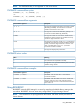
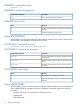
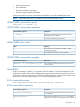
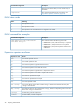

Table Of Contents
- HP Scripting Toolkit for Linux User Guide
- Contents
- 1 Introduction
- 2 Deployment using the Scripting Toolkit
- 3 Booting and OS installation
- 4 Scripting Toolkit utilities
- Native package formats
- Syntax conventions
- Utility online help
- Using Scripting Toolkit utilities
- Using REBOOT
- Using SETBOOTORDER
- Using STATEMGR
- Using RBSURESET
- Using BOOTEXTRACT
- Using HPDISCOVERY
- Using IFHW
- Using HWQUERY
- Using CONREP
- CONREP command-line syntax
- CONREP command line arguments
- CONREP return codes
- CONREP screen output
- CONREP -s (Store to Data file) Example usage for HP ProLiant servers not using the Oxx ROM family
- CONREP –l (Load from Data File) Example Usage for HP ProLiant servers not using the Oxx ROM family
- CONREP Data File Sample Contents for HP ProLiant servers not using the Oxx ROM family
- CONREP command file contents for HP ProLiant servers not using the Oxx ROM family
- Using HPRCU
- Using HPACUSCRIPTING
- Using HPLPCFG
- Using LO100CFG
- Using HPQLAREP
- Using HPONCFG
- 5 Troubleshooting
- 6 Support and other resources
- 7 Documentation feedback
- Acronyms and abbreviations
- Index

The utility displays information about its command line syntax, argument, and switches.
Using Scripting Toolkit utilities
The Scripting Toolkit utilities control the installation process, read the source server configuration,
and duplicate the configuration on a target server through a generated script file.
The Scripting Toolkit utilities include:
• REBOOT
• SETBOOTORDER (Limited functionality for HP ProLiant 100 series servers)
• STATEMGR (Utility is not supported on 100 series servers)
• RBSURESET
• BOOTEXTRACT
• HPDISCOVERY
• IFHW
• HWQUERY
• CONREP
• HPRCU
• HPACUSCRIPTING
• HPLPCFG
• LO100CFG (Utility only supports HP ProLiant 100 series servers)
• HPQLAREP
• HPONCFG (Not supported on HP ProLiant 100 series servers using the Oxx ROM family)
Using REBOOT
REBOOT, together with other utilities, is used from a batch file to control server reboots. This utility
enables the user to reboot the server with control over which device is the boot device. If no boot
drive argument is passed on to REBOOT, then the utility reboots the server using the drive specified
as the default drive.
REBOOT command-line syntax
REBOOT [DRIVE:] [/?]
REBOOT command-line arguments
DescriptionCommand line argument
Valid arguments that can be passed to REBOOT are A:,
C:, CD, RBSU, or PXE. By specifying an argument, the
[DRIVE:]
drive indicated is set to boot on the next reboot, and the
system is restarted. If no argument is provided, then the
system is set to boot using the defined boot order.
This argument performs a one-time cold boot of the system.
/cold
This argument displays help information.
/?
REBOOT return codes
There are no return codes for the REBOOT utility.
Using Scripting Toolkit utilities 23