
HP Scripting Toolkit 9.10 for Linux User Guide
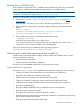
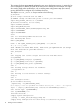
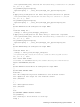
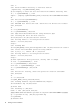
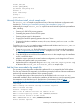
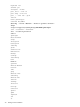
Table Of Contents
- HP Scripting Toolkit for Linux User Guide
- Contents
- 1 Introduction
- 2 Deployment using the Scripting Toolkit
- 3 Booting and OS installation
- 4 Scripting Toolkit utilities
- Native package formats
- Syntax conventions
- Utility online help
- Using Scripting Toolkit utilities
- Using REBOOT
- Using SETBOOTORDER
- Using STATEMGR
- Using RBSURESET
- Using BOOTEXTRACT
- Using HPDISCOVERY
- Using IFHW
- Using HWQUERY
- Using CONREP
- CONREP command-line syntax
- CONREP command line arguments
- CONREP return codes
- CONREP screen output
- CONREP -s (Store to Data file) Example usage for HP ProLiant servers not using the Oxx ROM family
- CONREP –l (Load from Data File) Example Usage for HP ProLiant servers not using the Oxx ROM family
- CONREP Data File Sample Contents for HP ProLiant servers not using the Oxx ROM family
- CONREP command file contents for HP ProLiant servers not using the Oxx ROM family
- Using HPRCU
- Using HPACUSCRIPTING
- Using HPLPCFG
- Using LO100CFG
- Using HPQLAREP
- Using HPONCFG
- 5 Troubleshooting
- 6 Support and other resources
- 7 Documentation feedback
- Acronyms and abbreviations
- Index
The scripting for these steps must be adapted to your server deployment process. In particular, be
sure to change the IP address and path of the NFS server to match your environment. You might
also need to make other modifications, such as adding extra configuration steps (for instance,
running HPONCFG to configure iLO) or additional servers.
The sample install_rhel4.sh script is similar to the following:
#!/bin/bash
## this script's methods work for RHEL 5
## SAMPLE. Change the NFS mount points to match your environment
export NFS_TOOLKIT_DIR=10.0.0.1:/TOOLKIT
## Internal Variables, do not modify
export TOOLKIT=/TOOLKIT
export NFS_MAIN=/mnt/nfs
export HPDISCOVERY_FILE=/TOOLKIT/hpdiscovery.xml
export SERVERNAME=
export BOOTDEVNODE=
clear
echo "*** Performing RHEL4 installation ***"
echo "Mounting NFS share"
mkdir ${NFS_MAIN}
mount -t nfs ${NFS_TOOLKIT_DIR} ${NFS_MAIN} -o ro,nolock
if [ $? != 0 ]; then
echo "Unable to mount NFS share, make sure you updated the $0 script
with the location of your NFS server."
exec /bin/bash
fi
echo "Copying over toolkit scripts and utilities from NFS share"
cd ${TOOLKIT}
cp -a ${NFS_MAIN}/scripts/* ${TOOLKIT}
cp -a ${NFS_MAIN}/utilities/* ${TOOLKIT}
cp -a ${NFS_MAIN}/data_files ${TOOLKIT}
echo ""
echo "Loading storage drivers for hardware"
./load_modules.sh
echo ""
echo "Pausing to allow drivers to finish loading"
sleep 15
echo ""
echo "Configure server"
## run hardware discovery
./hpdiscovery -f ${HPDISCOVERY_FILE}
## use hwquery to fetch the SystemName from hardware discovery file. ( extra " " are required )
export "`./hwquery ${HPDISCOVERY_FILE} allboards.xml SERVERNAME=SystemName`";
echo "Server Type: ${SERVERNAME}"
case "${SERVERNAME}" in
"ProLiant DL380 G4" )
# Apply System Configuration
./conrep -l -fdata_files/dl380g4_conrep.dat
# Apply Array Configuration for Smart Array 6i Controller if present
16 Booting and OS installation