
HP Scripting Toolkit 9.10 for Linux User Guide
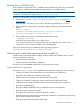
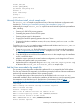
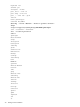
Table Of Contents
- HP Scripting Toolkit for Linux User Guide
- Contents
- 1 Introduction
- 2 Deployment using the Scripting Toolkit
- 3 Booting and OS installation
- 4 Scripting Toolkit utilities
- Native package formats
- Syntax conventions
- Utility online help
- Using Scripting Toolkit utilities
- Using REBOOT
- Using SETBOOTORDER
- Using STATEMGR
- Using RBSURESET
- Using BOOTEXTRACT
- Using HPDISCOVERY
- Using IFHW
- Using HWQUERY
- Using CONREP
- CONREP command-line syntax
- CONREP command line arguments
- CONREP return codes
- CONREP screen output
- CONREP -s (Store to Data file) Example usage for HP ProLiant servers not using the Oxx ROM family
- CONREP –l (Load from Data File) Example Usage for HP ProLiant servers not using the Oxx ROM family
- CONREP Data File Sample Contents for HP ProLiant servers not using the Oxx ROM family
- CONREP command file contents for HP ProLiant servers not using the Oxx ROM family
- Using HPRCU
- Using HPACUSCRIPTING
- Using HPLPCFG
- Using LO100CFG
- Using HPQLAREP
- Using HPONCFG
- 5 Troubleshooting
- 6 Support and other resources
- 7 Documentation feedback
- Acronyms and abbreviations
- Index
server = /usr/sbin/in.tftpd
server_args = -s /tftpboot
disable = yes
per_source = 11
cps = 100 2
}
In this example, disabled is the default setting, and /tftpboot is the root directory for all client
access.
To enable the TFTP service on your server, edit the disable line to read:
disable = no
Populating the TFTP directory share
Use the /tftpboot directory from the “Setting up a TFTP server” (page 13) section as the directory
where TFTP clients get their files. To populate the TFTP directory share:
1. Create a /tftpboot directory, if needed.
2. Copy the necessary boot files to the /tftpboot directory:
• pxelinux.0 (the SYSLINUX binary used for PXE boot)
• initrd.img (the Linux file system)
• vmlinuz (the Linux kernel)
3. Create a pxelinux configuration file subdirectory called /tftpboot/pxelinux.cfg.
4. Copy the default file (the boot configuration used by pxelinux.0) into the /tftpboot/
pxelinux.cfg/ directory.
The tftpboot directory should now contain the following items:
/tftpboot/pxelinux.0
/tftpboot/initrd.img
/tftpboot/vmlinuz
/tftpboot/pxelinux.cfg/default
Setting up a DHCP server
To set up a DHCP server, create and edit a dhcpd.conf file in the /etc directory of your server.
The following is a sample dhcpd.conf file:
allow booting;
allow bootp;
ddns-update-style interim;
[You must customize the file by inserting the appropriate DHCP directives, IP ranges, subnet masks,
and so on here.]
next-server IP_ADDRESS_OF_TFTP_SERVER;
filename "pxelinux.0";
The next-server command tells the DHCP client where to send the TFTP get request.
The filename command tells the DHCP client which file to get. In this example, the file is
pxelinux.0.
When you have finished creating the dhcpd.conf file, restart the DHCP server:
/etc/init.d/dhcpd restart
14 Booting and OS installation