
HP Scripting Toolkit 9.10 for Linux User Guide
Table Of Contents
- HP Scripting Toolkit for Linux User Guide
- Contents
- 1 Introduction
- 2 Deployment using the Scripting Toolkit
- 3 Booting and OS installation
- 4 Scripting Toolkit utilities
- Native package formats
- Syntax conventions
- Utility online help
- Using Scripting Toolkit utilities
- Using REBOOT
- Using SETBOOTORDER
- Using STATEMGR
- Using RBSURESET
- Using BOOTEXTRACT
- Using HPDISCOVERY
- Using IFHW
- Using HWQUERY
- Using CONREP
- CONREP command-line syntax
- CONREP command line arguments
- CONREP return codes
- CONREP screen output
- CONREP -s (Store to Data file) Example usage for HP ProLiant servers not using the Oxx ROM family
- CONREP –l (Load from Data File) Example Usage for HP ProLiant servers not using the Oxx ROM family
- CONREP Data File Sample Contents for HP ProLiant servers not using the Oxx ROM family
- CONREP command file contents for HP ProLiant servers not using the Oxx ROM family
- Using HPRCU
- Using HPACUSCRIPTING
- Using HPLPCFG
- Using LO100CFG
- Using HPQLAREP
- Using HPONCFG
- 5 Troubleshooting
- 6 Support and other resources
- 7 Documentation feedback
- Acronyms and abbreviations
- Index
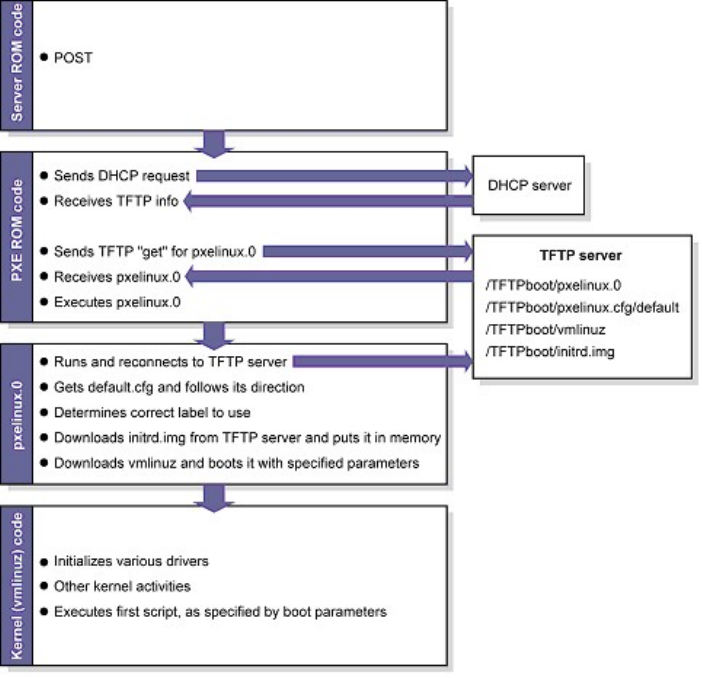
Setting up a PXE boot environment requires the following general steps:
1. Set up a DHCP server with the appropriate options.
2. Set up a TFTP server with the appropriate options.
3. Populate the TFTP directory share with the Scripting Toolkit boot components.
These steps assume that a Linux workstation is used as the DHCP/TFTP server. You might need to
download additional components and adapt the following instructions to suit your environment.
Setting up a TFTP server
Most Linux installations include a TFTP server and an automated method of launching the server
upon receiving a TFTP request. The parent process for detecting a TFTP request and launching the
TFTP server is called xinetd. However, you might have to enable the TFTP service. The TFTP file is
located in the /etc/xinetd.d/ directory. The following is a sample TFTP file:
# default: off
# description: The tftp server serves files using the \
# trivial file transfer protocol. The tftp protocol is \
# often used to boot diskless workstations, download \
# configuration files to network-aware printers and to \
# start the installation process for some operating systems.
service tftp
{
socket_type = dgram
protocol = udp
wait = yes
user = root
Booting using PXE 13