
HP Installation Guide, HP Integrity Superdome/sx2000 and HP 9000 Superdome/sx2000 Servers


Inspecting the Shipping Containers for Damage
HP shipping containers are designed to protect their contents under normal shipping conditions.
After the equipment arrives at the customer site, carefully inspect each carton for signs of shipping
damage.
WARNING! Do not attempt to move the cabinet, packed or unpacked, up or down an incline
of more than 15 degrees.
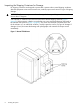
A tilt indicator is installed on the back and side of the cabinet shipping container (Figure 1
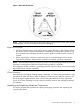
(page 8)). If the container is tilted to an angle that can cause equipment damage, the beads in
the indicator shift positions (Figure 2 (page 9)). If a carton has received a physical shock and
the tilt indicator is in an abnormal condition, visually inspect the unit for any signs of damage. If
damage is found, document the damage with photographs and contact the transport carrier
immediately.
Figure 1 Normal Tilt Indicator
8 Installing the System