
HP Installation Guide, HP Integrity Superdome/sx2000 and HP 9000 Superdome/sx2000 Servers
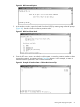
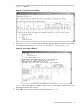

1. To observe the power status, enter ps at the CM> prompt. A status screen similar to the one
in Figure 51 appears.
Figure 51 Power Status First Window
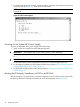
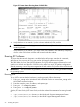
2. At the Select Device: prompt, enter b then the cabinet number to check the power status
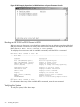
of the cabinet. Observe Power Switch: on and Power: enabled (Figure 52).
Figure 52 Power Status Window
Figure 52 shows that cells are installed in slots 0 and 4. In the cabinet, verify that cells are
physically located in slots 0 and 4.
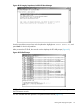
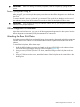
3. Press <CR> one more time to observe the power status (Figure 53).
Booting and Verifying the System 55