
HP Installation Guide, HP Integrity Superdome/sx2000 and HP 9000 Superdome/sx2000 Servers

1. On the SMS, open the following command prompt windows:
• One console window for each partition (MP CO option)
• One for initializing the RS command from the MP
• One for monitoring partition status (MP VFP option)
In each window, connect to the MP by entering the following:
telnet <MP hostname>
Or
telnet <IP address>
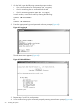
2. Enter the appropriate login and password at the MP prompts (Figure 42).
Figure 42 Logging In
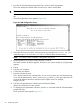
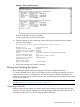
The MP Main Menu appears (Figure 43).
Figure 43 Main MP Menu
3. Repeat steps 1 and 2 for each partition.
4. In one window bring up the command prompt by entering cm at the MP> prompt (Figure 44).
50 Installing the System