
HP Installation Guide, HP Integrity Superdome/sx2000 and HP 9000 Superdome/sx2000 Servers
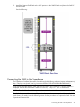
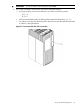
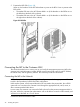
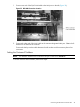
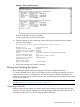
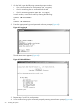

2. Install the Support Shelf Rack at the U15 position in the 10KG2 Rack and place the SMS PC
onto the shelf.
See the following:
Connecting the SMS to the Superdome
The Superdome Cookbook document is found through the following website (requires authentication):
http://athp.hp.com/portal/site/sig/menuitem.260d6c199fc475a058b9d8a989806e01/
In the Search the Sales Library: field, enter the keywords: SMS Cookbook. A second window is
displayed with the file information. Select Worldwide, English (US) to download.
NOTE: The SMS Cookbook file is presented as a Windows Visio file.
The SMS software and 3 revisions of Superdome firmware histories are preloaded onto the SMS
at the factory. If needed, see the following section for the procedures to capture the SMS SW and
Superdome firmware files.
Connecting the SMS to the Superdome 41