
HP Installation Guide, HP Integrity Superdome/sx2000 and HP 9000 Superdome/sx2000 Servers
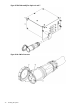
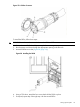

6. Reinstall the rear PDCA bezel.
CAUTION: Do not measure voltages with the PDCA breaker set to ON. Make sure the
electrical panel breaker is ON and the PDCA breaker is OFF.
7. Plug in the PDCA connector.
8. Check the voltage at the PDCA:
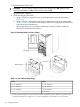
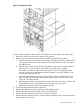
a. Using a T-20 driver, remove the screw on the hinged panel at the top of the PDCA.
(Figure 29).
b. Using a voltmeter, measure the test points and compare the values to the ranges given
in Table 3 (page 34) to make sure the voltages conform to the specifications for the PDCA
and local electrical specifications.
If the voltage values do not match the specifications, have the customer contact an
electrician to troubleshoot the problem.
Figure 29 Checking PDCA Test Points (5-Wire)
Table 3 4- and 5-Wire Voltage Ranges
5-Wire4-Wire
L1 to N: 200-240 VL2 to L3: 200-240 V
L2 to N: 200-240 VL2 to L1: 200-240 V
L3 to N: 200-240 VL1 to L3: 200-240 V
N to Ground:
1
1 Neutral to ground voltage can vary from millivolts to several volts depending on the distance to the ground/neutral
bond at the transformer. Any voltage over 3 V must be investigated by a site preparation or power specialist.
34 Installing the System