
HP Installation Guide, HP Integrity Superdome/sx2000 and HP 9000 Superdome/sx2000 Servers
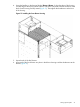
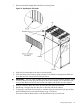
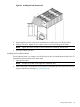

4. Using the handles on the housing labeled Blower 0 Blower 1, align the edge of the housing
over the edge at the top front of the cabinet, and slide it into place until the connectors at the
back of each housing are fully mated (Figure 15). Then tighten the thumbscrews at the front
of the housing.
Figure 15 Installing the Front Blower Housing
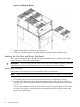
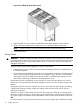
5. Unpack each of the four blowers.
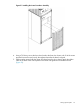
6. Insert each of the four blowers into place in the blower housings with the thumbscrews at the
bottom (Figure 16).
Setting Up the System 21