
HP Installation Guide, HP Integrity Superdome/sx2000 and HP 9000 Superdome/sx2000 Servers
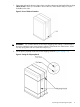
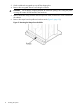
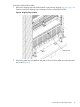
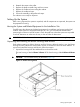

2. Remove the cardboard from the blower housing (Figure 13).
This cardboard protects the housing baffle during shipping. If it is not removed, the fans can
not work properly.
Figure 13 Removing Protective Cardboard from the Housing
NOTE: Double-check that the protective cardboard has been removed.
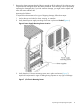
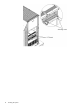
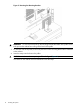
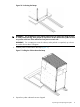
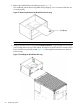
3. Using the handles on the housing labeled Blower 3 Blower 2, align the edge of the housing
over the edge at the top rear of the cabinet, and slide it into place until the connectors at the
back of each housing are fully mated (Figure 14). Then tighten the thumbscrews at the front
of the housing.
Figure 14 Installing the Rear Blower Housing
20 Installing the System