
Site Preparation Guide, Fifth Edition - HP Integrity Superdome and HP 9000 Superdome







Appendix A
Tem plat es
Computer Room Layout Plan
81
Computer Room Layout Plan
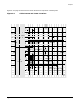
Use the following procedure to create a computer room layout plan:
Step 1. Remove several copies of the floor plan grid.
Step 2. Cut and join them together (as necessary) to create a scale model floor plan of your computer room.
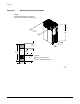
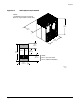
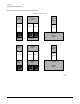
Step 3. Remove a copy of each applicable equipment footprint template.
Step 4. Cut out each template selected in Step 3; then place it on the floor plan grid created in Step 2.
Step 5. Position pieces until the desired layout is obtained; then fasten the pieces to the grid. Mark
locations of computer room doors, air-conditioning floor vents, utility outlets, and so on.
NOTE Attach a reduced copy of the completed floor plan to the site survey located in Chapter 4,
“Pre-installation Survey.” Hewlett-Packard field engineers use this floor plan during equipment
installation.