
Site Preparation Guide, Fifth Edition - HP Integrity Superdome and HP 9000 Superdome




Chapter 3
Electrical Specifications
Power Options
22
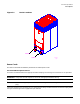
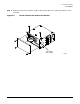
Figure 3-6 PDCA Input Wiring Connections (5-Wire Unit Shown)
Cable Installation
NOTE These procedures may be used for early deliveries consisting of either option 1 or option 2 as
well as those later systems delivered with PDCA cables attached.
Select the proper cable using the following criteria.
• Each cabinet using a 3-phase, 4-wire input is required to have a four-conductor cable. The four-conductor
cable selected by the facility electrician shall be in accordance with local electrical codes to support the
selected circuit breaker for the maximum Product Label current of 44A per phase. The facility electrician
and local electrical codes will determine proper power cord selection dependent upon desired application
such as rigid conduit, flexible conduit, or cable bundle. Observe derating factors for multiple wires per
cable.
• Each cabinet using a 3-phase 5-wire input is required to have a five-conductor cable. The five-conductor
cable selected by the facility electrician shall be in accordance with local electrical codes to support the
selected circuit breaker for the maximum Product Label current of 24A per phase. The facility electrician
and local electrical codes will determine proper power cord selection dependent upon desired application
such as rigid conduit, flexible conduit, or cable bundle. Observe derating factors for multiple wires per
cable.
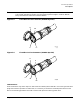
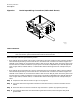
Step 1. Prepare the new cable as shown in Figure 3-7 on page 23.
Step 2. Using the cable retaining hardware saved from the cable removal, route the new cable into the
PDCA.
Step 3. Route the cable into the PDCA terminal lugs and secure in position by tightening the lugs.
Step 4. Using the hardware that was retained during the cable removal, attach the green and yellow
ground cable.
7/13/00
60SP041A
L3-L1 L2-L3 L1-L2
N