
Installation Guide, Second Edition - HP Integrity rx1600





Chapter 3
Installing and Configuring
Installing Additional PCI Cards
42
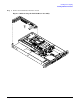
Step 4. Remove the PCI slot cover.
Figure 3-27Removing a PCI Slot Cover
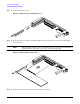
Step 5. Grasp the edges of the PCI card being installed and gently press the connector into the PCI I/O
riser connector.
NOTE Full length PCI cards may only be installed in slot 1, the top slot of the PCI I/O riser
assembly. The lower slot (slot 2) can only accept half length cards.
Figure 3-28Installing a PCI Card
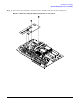
Step 6. Insert the card mounting screw and secure with a T-15 driver.