
HP Integrity rx1600 Operation and Maintenance Guide

Chapter 5
Utilities
Specifying SCSI Parameters
71
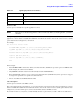
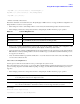
Drv[3D] Ctrl[15] Lang[eng]
Drv[3F] Ctrl[19] Lang[eng]
Drv[45] Ctrl[17] Lang[eng]
Drv[45] Ctrl[18] Lang[eng]
This listing shows which driver controls which device (controller). In the above example, the SCSI interface
information is shown highlighted bold. You can tell the information is for this SCSI interface because the values
shown for Ctrl—17 and 18—are the controller’s handles for the SCSI interface two channels (from the information
displayed by the devtree command).
NOTE The EFI driver’s handle values will change on every boot.
TIP From this command (drvcfg), we recommend you record these two pieces of information for
each channel of each SCSI interface for parameters to be changed:
• Drv (the EFI driver’s handle)
• Ctrl (the controller’s handle)
Step 4. Using the information (the driver’s handle [Drv] and the controller’s handle [Ctrl]) from the drvcfg command,
start the EFI SCSI Setup Utility for one channel of this SCSI interface. Still at the EFI shell prompt, type this
command:
drvcfg -s drvr_handle cntrl_handle
where
• drvr_handle is the handle of the driver that controls the channel whose SCSI ID you want to display or
change
• cntrl_handle is the handle of the controller for the channel whose SCSI ID you want to display or change
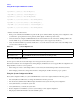
So, continuing the example for channel A of this SCSI interface, you would type:
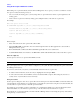
drvcfg -s 45 18
Step 5. The EFI SCSI Setup Utility starts and its main menu is displayed, showing a list of all the EFI capable SCSI
interfaces in the system.