
HP Integrity rx1600 Operation and Maintenance Guide

Chapter 5
Utilities
Specifying SCSI Parameters
69
• Slot #—identifies the physical card slot in the system where the SCSI interface is installed; for the SCSI
interface, this is the same for both channels. In this example, the SCSI interface is on the system board
therefore the in slot number is xx.
• Path—identifies the device’s path; for the SCSI interface, this is the same for both channels. In this example,
the SCSI interface path is Acpi(HWP0002,200)/Pci(1|0) for channel A and
Acpi(HWP0002,200)/Pci(1|1) for channel B.
Using the SCSI interface information from the example above, the pieces of information that, combined, tell you
this is a SCSI interface are the following (shown in bold, for highlighting purposes):
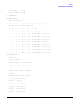
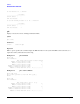
00 20 01 00 0x1000 0x0030 xx Acpi(HWP0002,200)/Pci(1|0)
00 20 01 01 0x1000 0x0030 xx Acpi(HWP0002,200)/Pci(1|1)
Looking at all of the above information together, the vendor (0x1000) and device (0x0030) are the IDs for a SCSI
interface. Of the devices with those IDs, this device has two channels (Fnc # of 00 immediately followed by Fnc #
of 01). Also, this SCSI interface has a non-numeric (XX) slot # indicating that it is on the system board.
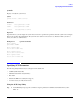
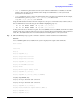
Step 2. Still at the EFI shell prompt, type this command to obtain the controller’s handle for the SCSI interface:
devtree
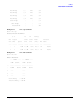
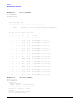
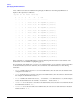
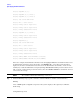
A tree of all EFI-capable devices installed in the system is displayed. The output could look like this:
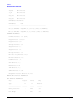
Shell> devtree
Device Tree
Ctrl[04]
Ctrl[0A] Acpi(HWP0002,0)
Ctrl[12] Usb Open Host Controller
Ctrl[13] Usb Open Host Controller
Ctrl[14] Acpi(HWP0002,0)/Pci(1|2)
Ctrl[15] PCI IDE/ATAPI Controller
Ctrl[48] DW-28E
Ctrl[83] FAT File System [FAT32] 118 MB
Ctrl[16] Acpi(HWP0002,0)/Pci(3|0)
Ctrl[49] Acpi(HWP0002,0)/Pci(3|0)/Mac(00306E4C4F1A)
Ctrl[0B] Acpi(HWP0002,100)
Ctrl[17] LSI Logic Ultra320 SCSI Controller
Ctrl[18] LSI Logic Ultra320 SCSI Controller
Ctrl[19] Acpi(HWP0002,100)/Pci(2|0)
Ctrl[4B] Broadcom NetXtreme Gigabit Ethernet (BCM5701)
Ctrl[0C] Acpi(HWP0002,200)
Ctrl[0D] Acpi(HWP0002,400)