
HP Integrity rx1600 Operation and Maintenance Guide

Chapter 4
Installing and Configuring
Installing Processors and Memory
38
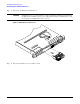
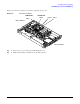
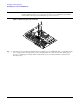
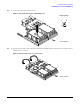
Step 5. Use the special processor tool (P/N 5069-5441) shipped with your replacement processor assembly to lock the
processor in place on the system board. To do this, insert the special processor tool into the lock and rotate it
clockwise 180 degrees.
Figure 4-8Locking the Processor Assembly in Place
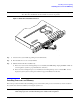
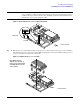
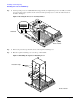
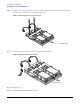
Step 6. Remove the protective caps from the screws on the sequencer retaining cover.
Step 7. Place the sequencer retaining cover over the top of the heatsink.
Figure 4-9Installing the Sequencer Retaining Cover
Front of server
Unlocked
Locked
Protective caps
Front of server