
HP Integrity rx1600 Operation and Maintenance Guide



Chapter 7
Removing and Replacing Components
Removing and Replacing an Internal Hard Disk Drive
161
CAUTION A hot-swap device may require interaction with the operating system before the device can be safely installed
into the server. Verify that the operating system supports installing disk drives while the operating system is
running. If the operating system does not support this feature, shut down the operating system before
attempting this procedure. Failure to observe this caution will result in system failure.
Removing an Internal Hard Disk Drive
One additional disk drive may be added to your HP Server in slot 1. Always use low profile disk drives (1.0” height) in your
hp Integrity rx1600 Server.
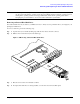
To remove a disk drive, perform the following steps:
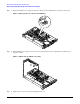
Step 1. Open the drive-ejector handle by lifting it up until the drive releases from the connector.
Step 2. Pull the drive forward and away from the SCSI cage.
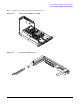
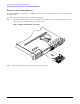
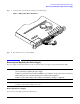
Figure 7-34Removing an Internal Hard Disk Drive
Step 3. Place the removed drive in an antistatic container.
Step 4. If a replacement disk drive is not being installed, cover the drive slot with a slot filler panel.