
HP Integrity rx1600 Operation and Maintenance Guide


Chapter 7
Removing and Replacing Components
Removing and Replacing Fan Units
150
Removing and Replacing Fan Units
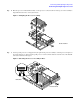
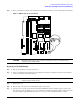
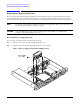
There are three fan units in the hp Integrity rx1600 Server. Chassis fan units 2 and 3 are located at the right of the chassis
spanning the full width of the system board. Chassis fan units 2 and 3 are interchangeable and are in the center and right
positions respectively. Power supply fan unit 1 is smaller and only fits into the left-most position (behind the power supply).
NOTE The fan units of the hp Integrity rx1600 Server are NOT hot-swappable units. Remover power from the server
prior to performing the remove or replace procedures.
CAUTION Observe all ESD safety precautions before attempting this procedure. Failure to follow ESD safety
precautions could result in damage to the server.
Removing the Power Supply Fan Unit
To remove the power supply fan unit, perform the following steps:
Step 1. Remove the cover. See “Removing and Replacing the Cover”.
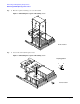
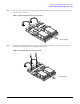
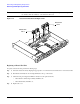
Step 2. Grasp the edges of the fan unit and pull the fan up and out of the chassis.
Figure 7-25Power Supply Fan Unit Removal/Replacement
Power Supply
Fan - Fan 1