
Virtual Hometerm Subsystem (VHS) Manual (H06.03+)

Using the VHS Browser
Virtual Hometerm Subsystem (VHS) Manual—429311-001
4-18
Prompt Detail Function Key Descriptions
Prompt Detail Function Key Descriptions
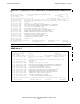
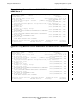
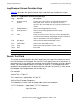
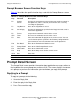
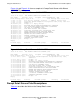
Table 4-7 describes the specific function keys used within the Prompt Detail screen.
VHS Profile Screen
The VHS Profile screen provides profile information about VHS. Use the screen
information to modify VHS profile data. From the VHS Profile screen you can view the
following information:
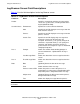
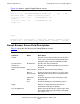
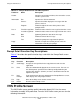
Table 4-6. Prompt Detail Screen Field Descriptions
Field/Line Name Description
Header Specifies current date and time, the name of the screen,
and the system name
Information Env Specifies the VHS environment
Process Specifies that VHS display the messages from the
process entered
Program Shows the object file name of the process that
prompted VHS
Line 4 First Message Date Shows the date of the first message listed on the screen
Last Message Date Shows the date of the last message listed on the screen
Data Date [Optional] Shows the date of the message
Time Shows the time of the message
Text Shows the prompt message from the process
Reply Provides an input field so that you can enter the
information needed by the prompt
Note. The field Last Message Data is available with only the D21 version and newer.
Table 4-7. Prompt Detail Screen Function Keys
Key Function Description
F6 Send Reply Accepts the text specified in the reply field and sends it to the
application
F9 Print Prints the information displayed on the current screen. You can use
the default printer specified in the Pathway configuration for your
terminal (the default is $s.#zvhs) or enter a destination name on the
option line (line 24)
F11 Next
Prompt
If you marked more than one prompt on the Prompt Browser screen,
VHS displays the next prompt marked
F15 Help Goes to the Help screen for the current screen
F16 Return Returns to the Prompt screen