
TS/MP 2.5 Pathsend and Server Programming Manual
records are locked too early, other transactions cannot access them and the application’s
concurrency (its ability to process many transactions at the same time) suffers.
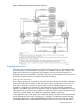
As the Enter Sales transaction demonstrates, all the data collection and validation operations can
happen before you begin the TMF transaction—although some revalidation might be done again
as part of the transaction. Assembling the order header and assembling the order involve reading
records in the database but not changing the records. The rest of the operations change the
database and must all be done within a TMF transaction.
As a general rule, you must design the application’s transactions to maintain consistency under
all circumstances. After the application is installed and running successfully, you can look for ways
to improve its concurrency.
Aborting Transactions
If the requestor or the server program detects a problem during the processing of a TMF transaction,
the transaction is aborted with a special procedure call or statement (for example, a call to
ABORTTRANSACTION in a Pathsend program). For requestors, the statement that aborts a
transaction is executed in lieu of the statement that ends a transaction; for example, in a Pathsend
program the requestor either completes the transaction with a call to ENDTRANSACTION or causes
it to be backed out, because of an error with a call to ABORTTRANSACTION.
In the past, program designs typically assigned the task of aborting transactions to requestors.
Current program design often assigns that task to servers. Servers abort transactions and inform
the requestors of those actions, therefore ensuring protection of data. The aborting of transactions
by servers is described further under “Designing Server Programs” (page 42), later in this chapter.
The TMF subsystem backs out aborted transactions by using information contained in the TMF
audit-trail files. For more information about transaction backout and audit-trail files, see the HP
NonStop Transaction Management Facility (TMF) Application Programmer’s Guide.
Designing the Database
The next step in developing a Pathway application is to design the database that will be accessed
and updated by the application. Designing the database, which is a highly specialized activity
typically performed by experienced database administrators, involves:
• Precisely identifying the meaning and use of the data as it exists in your business and specifying
the database files and records that will store this data. This step is referred to as logical design.
• Choosing file types and keys for the records. This step is referred to as physical design.
In addition to completing a logical and physical design of your database, you must also select a
database manager product and ensure that your server programs can interface with that database
manager.
Logical Design
During the logical design process, you determine which data classes must be maintained by your
application and identify the relationships that exist between the classes. Each class of data names
something that the database will store information about. For example, in an application that
processes sales orders, orders is a class of data and order-items is a relationship between
a particular order and the inventory items within the order. These data classes and relationships
generally become records in files accessed by the application.
After specifying data classes, you list the attributes (data items) for each class of data. For example,
some of the attributes are order-ID, cust-ID, and order-total. These attributes become
fields in the records of the database. After specifying attributes for data classes, you diagram the
Designing the Database 33