
ServerNet Cluster Supplement for NonStop NS-Series Servers (H06.05+)

Integrity NonStop NS-series Server Supplement
ServerNet Cluster Supplement for HP Integrity NonStop NS-Series Servers—529933-003
1-7
SCF Displays for NonStop NS-Series Nodes in a
ServerNet Cluster
Adding a ServerNet Switch Board
Use can use the Add Node to ServerNet Cluster guided procedure to add a
ServerNet switch board. (See Adding the Node to a ServerNet Cluster.) Do not
connect the cables until instructed to do so by the guided procedure.
Adding the Node to a ServerNet Cluster
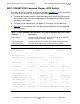
1. As noted in Table 1-2, the 6780 cluster switch slot used for connecting to an
Integrity NonStop NS14000 system must have a quad MMF PIC. Replace or add a
PIC as needed.
2. Start the guided procedure for adding an Integrity NonStop NS14000 node to a
new or existing ServerNet cluster:
a. In the tree pane of the OSM Service Connection, right-click the system object
and select Actions.
b. Select Add Node to ServerNet Cluster and click Perform Action.
c. In the guided procedure, click Start.
SCF Displays for NonStop NS-Series Nodes in
a ServerNet Cluster
For detailed syntax and descriptions of the Subsystem Control Facility (SCF)
commands, refer to:
For an Integrity NonStop NS-series node, the commands and displays are the same as
described in the existing manuals except for the differences noted here.
INFO CONNECTION Command (6780 Switch)
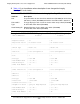
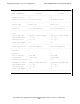
The output display for the INFO CONNECTION command varies, depending on the
type of Integrity NonStop NS-series system. Example 1-1 on page 1-8, shows an
example of a 6780 switch connected to an Integrity NonStop NS16000 node.
Example 1-2 on page 1-9, shows an example of a 6780 switch connected to an
Integrity NonStop NS14000 node.
•
The Node port heading replaces the MSEB port heading displayed for NonStop
S-series nodes. The Node port heading contains information about the port on the
p-switch (NS16000) or ServerNet switch board (NS14000) that connects to the
cluster switch.
•
The NNA Version attribute does not appear in the displays for the Node Port.
6770 Switch ServerNet Cluster Manual
6780 Switch ServerNet Cluster 6780 Operations Guide