
Pathway/iTS System Management Manual (H06.03, J06.03+)


TERM Commands
HP NonStop Pathway/iTS System Management Manual—426748-005
10-45
Procedure for Synchronous Upgrade
Procedure for Synchronous Upgrade
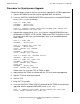
Perform the following steps to achieve synchronous upgrade for SCOBOL applications:
1. Select a PATHMON server that must be upgraded within the domain.
2. Issue the CONTROL DOMAIN PARTITION command for the selected PATHMON
server ($PM1.SRV) on the domain:
PDMI 1>> OPEN %dom
PATHMON : \NSSYS.$PM1
PATHMON : \NSSYS.$PM2
PDMI 2>> CONTROL DOMAIN PARTITION PATHMON $PM1 SERVER SRV
%dom PARTITIONED FOR $PM1.SRV
3. Upgrade the selected server ($PM1.SRV) from the selected PATHMON using a
combination of FREEZE, STOP, ALTER, THAW, and START commands. In most
cases, the server will have a new executable, which is not compatible with the
older TERMs:
PDMI 3>> OPEN $PM1
PATHMON : \NSSYS.$PM1
PDMI 4>> FREEZE SRV; STOP SRV
PATHMON : \NSSYS.$PM1
$Z2L0: SERVER SRV, FROZEN
STOP SRV
PATHMON : \NSSYS.$PM1
$Z2L0: SERVER SRV, STOPPED
PDMI 5>> ALTER SRV, PROGRAM newexe
PATHMON : \NSSYS.$PM1
PDMI 6>> THAW SRV; START SRV
PATHMON : \NSSYS.$PM1
$Z2L0: SERVER SRV, THAWED
START SRV
PATHMON : \NSSYS.$PM1
$Z2L0: SERVER SRV, STARTED
Follow steps 4 to 11 to alter TCP or TERMs or both:
4. Stop and alter the TERMs associated with the TCP that need to be upgraded.
5. Stop the TCP that needs to be altered.
6. Alter the TCP.
7. Bring the TCP up again.
8. Issue the CONTROL TERM COUPLE command for the TERMs that need to be
upgraded, with the upgraded PATHMON server ($PM1.SRV):
PDMI 7>> CONTROL TERM TERM1 COUPLE SERVER SRV WITH $PM1
$Z2L0: TERM1 COUPLED WITH $PM1.SRV