
NonStop Servlets for JavaServer Pages (NSJSP) 7.0 System Administrator's Guide

Managing NSJSP
NonStop Servlets for JavaServer Pages (NSJSP) 7.0 System Administrator’s Guide—674372-005
4-38
NSJSP Manager Operations
1. Complete the steps described in Viewing Application Summary on page 4-22.
2. Click Initialization Parameters.
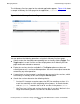
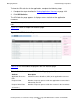
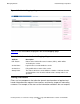
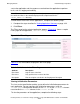
The Initialization Parameters page for the selected application appears. Figure 4-17
shows a sample Initialization Parameters page for an application.
Table 4-14 lists the context initialization parameters.
Managing Web Applications
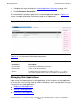
Upon successful deployment of a web application, all the instances of that application
on a Host are in the running state, by default. Following is the list of operations that you
can perform on a web application:
Stopping a Web Application
Starting a Web Application
Reloading a Web Application
Figure 4-17. Initialization Parameters Page
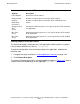
Table 4-14. Context Initialization Parameters
Parameters Description
Param Name Name of the initialization parameter.
Param Value Value set for the parameter.
Source Location where the parameter is defined. The web.xml file is
one of the locations where you can configure the parameters.