
NonStop NS16000 Series Planning Guide (H06.11+)
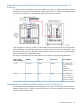
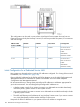

NOTE: Do not perform the next two bulleted items if your backup system console is shipped
with a new NonStop NS16000 series system. In this case, HP has already configured these
items for you.
• Change the preconfigured DHCP configuration of the backup system console before you add
it to the LAN.
• Change the preconfigured IP address of the backup system console before you add it to the
LAN.
CAUTION: Networks with more than one path between any two systems can cause loops
that result in message duplication and broadcast storms that can bring down the network. If
a second connection is used, refer to the documentation for the ProCurve maintenance switch
and enable STP in the maintenance switches. STP ensures only one active path at any given
moment between two systems on the network. In networks with two or more physical paths
between two systems, STP ensures only one active path between them and blocks all other
redundant paths.
Primary and Backup System Consoles Managing Multiple Systems
If you want to manage more than one system from a console (or from a fault-tolerant pair of
consoles), you can daisy chain the maintenance switches together. This configuration requires an
IP address scheme to support it. Contact your HP service provider to design this configuration.
Dedicated Service LAN 149