
NonStop NS14000 Series Planning Guide (H06.13+)
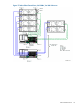

For more information on the Fibre Channel disk module, see “Fibre Channel Disk Module (FCDM)”
(page 24).
Factory-Default Disk Volume Locations
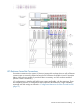
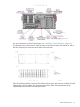
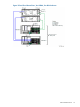
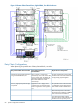
This illustration shows where the factory-default locations for the primary and mirror system disk
volumes reside in separate Fibre Channel disk modules:
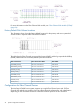
This table lists the Fibre Channel group-module-slot-port (GMSP) and disk group-module-shelf-bay
(GMSB) identification for the factory-default system disk locations:
Disk GMSB*Fibre Channel Port GMSPDisk Volume Name
100.211.101100.2.1.1 and 100.3.1.1$SYSTEM (primary)
100.211.102100.2.1.1 and 100.3.1.1$DSMSCM (primary)
100.211.103100.2.1.1 and 100.3.1.1$AUDIT (primary)
100.211.104100.2.1.1 and 100.3.1.1$OSS (primary)
100.212.101100.2.1.2 and 100.3.1.2$SYSTEM (mirror)
100.212.102100.2.1.2 and 100.3.1.2$DSMSCM (mirror)
100.212.103100.2.1.2 and 100.3.1.2$AUDIT (mirror)
100.212.104100.2.1.2 and 100.3.1.2$OSS (mirror)
Configurations for Fibre Channel Devices
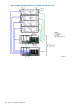
The NonStop NS14000 series system supports up to eight Fibre Channel ports and 32 Fibre
Channel disk modules are possible when using daisy-chained configurations, with identification
depending on the ServerNet connection to the Fibre Channel ports on the VIO enclosure.
74 System Configuration Guidelines