
NonStop NS14000 Series Planning Guide (H06.13+)
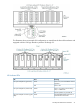
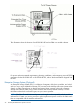

High availability and a fault-tolerant configuration for the Fibre Channel ports on the VIO enclosures
are similar to the configurations required for Fibre Channel disk drives, as explained in “VIO
Enclosure and Disk Storage Considerations” (page 72).
Cables and switches vary, depending on whether the connection is direct, switched, or a
combination:
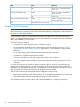
Fibre Channel SwitchesLC-LC CablesConnection
02 Fibre Channel portsDirect connect
1 or more4 Fibre Channel portsSwitched
12 Fibre Channel ports for each direct
connection4 Fibre Channel ports for
each switched connection
Combination of direct and switched
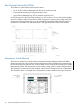
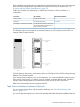
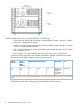
This illustration shows an example of connections between two VIO enclosures and an ESS via
separate Fibre Channel switches:
For fault tolerance, the primary and backup paths to an ESS logical device (LDEV) must go through
different Fibre Channel switches.
Some storage area procedures, such as reconfiguration, can cause the affected switches to pause.
If the pause is long enough, I/O failure occurs on all paths connected to that switch. If both the
primary and the backup paths are connected to the same switch, the LDEV goes down.
Refer to the documentation that accompanies the ESS.
Tape Drive and Interface Hardware (Optional)
For an overview of tape drives and the interface hardware, see “Fibre Channel Port to Tape
Devices” (page 72).
For a list of supported tape devices, refer to the NonStop NS14000 Hardware Installation Manual.
NonStop NS14000 Series Hardware 27