
NonStop NS1000 Planning Guide (H06.08+)
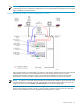
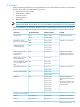
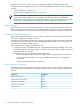
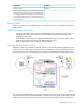
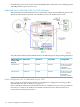
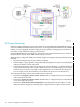

As this illustration shows, the OSM console connects to a closed and private service LAN,
connecting the VIO enclosures via a maintenance switch (a ProCurve).
Other hardware modules contain at least one microprocessor and firmware that performs
maintenance functions for their local logic:
• Blade element
• Fibre Channel disk module (FCDM)
The ServerNet fabrics, rather than the dedicated service LAN, provide maintenance
interconnection to the OSM console for these modules.
The ServerNet fabrics, rather than the dedicated service LAN, provide maintenance
interconnection to the OSM console for these modules.
Dedicated Service LAN
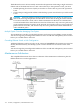
A dedicated service LAN provides connectivity between the OSM console running in a PC and
the maintenance firmware in the system hardware. This dedicated service LAN uses a ProCurve
Ethernet switch for connectivity between the VIO enclosures and the system console.
This subsection includes:
• “Basic Configuration” (page 113)
• “Fault-Tolerant Configuration” (page 113)
• “IP Addresses” (page 115)
• “Ethernet Cables” (page 117)
• “SWAN Concentrator Restrictions” (page 117)
• “System-Up Dedicated Service LAN” (page 117)
• “Dedicated Service LAN Links With Two VIO Enclosures” (page 118)
• “Initial Configuration for a Dedicated Service LAN” (page 118)
• “Operating Configurations for Dedicated Service LANs” (page 119)
An Integrity NonStop NS1000 system requires a dedicated LAN for system maintenance through
OSM. Only components specified by HP can be connected to a dedicated LAN. No other access
to the LAN is permitted. The dedicated service LAN provides connectivity between the OSM
console running on a PC and the maintenance firmware in the system hardware.
NOTE: System consoles require a dedicated LAN for installation and use of the complete set
of OSM client applications.
Basic Configuration
A basic dedicated service LAN that does not provide a fault-tolerant configuration requires
connection of these components to the ProCurve maintenance switch installed in the modular
cabinet:
• One connection for each system console running OSM.
• One connection for each VIO enclosure.
• At least one connection to an Ethernet port in each VIO enclosure. You must have these
connections to use the OSM Service Connection and OSM Notification Director.
• (Optional) one connection to one or more uninterruptible power sources (UPSs).
Fault-Tolerant Configuration
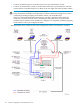
• Connect one system console to each maintenance switch.
• Connect the VIO enclosure for the X fabric to one of the maintenance switches and the VIO
enclosure for the Y fabric to the other maintenance switch.
Dedicated Service LAN 113