
NonStop Development Environment for Eclipse Debugging Supplement

NOTE: Automatic updates of the Variables and Modules views slow stepping performance. When
automatic updates are enabled, the stepping performance is most impacted when you step into a
function, because that is when the initial local variable list for the function is created. To improve
stepping performance, see “Improving the stepping performance of the debugger” (page 9)
Source tab
Use the Source tab to configure where to search for source files for applications that are under
debugger control. The Source tab is available in the Debug Configurations dialog.
DescriptionComponent
Contains a list of source lookup rules. You use these rules to search for the source files. Rules
are used in order, top to bottom. The Default rule folder can contain only one entry, which is
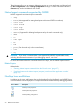
a Compile-Time File Path rule. For example, Figure 10 (page 29) shows the initial Source tab
with a single Default rule for source lookup (as shown for remote NonStop projects).
Source Lookup Path:
Adds additional rulesAdd...
Edits the currently-selected ruleEdit...
Removes the currently-selected ruleRemove
Moves the currently-selected rule up one position in the listUp
Moves the currently-selected rule down one position in the listDown
Restores the default source lookup rule.Restore Default
Specifies the NonStop system on which to search for files:
• Lookup on same system as launch (see Main tab), when selected, specifies that NSDEE
look for the files on the same system as specified for the debugging configuration on the
Main tab.
• Lookup on system:, when selected, specifies that NSDEE look for the files on the system
specified in the box. To specify the system, select the system in the drop-down list or click
Edit... to specify a different system than those shown in the list.
NonStop system (for
Remote Path Lookup)
Add Source dialog
Use the Add Source dialog to select and add any of the six types of source lookup rules listed in
Table 1 (page 47).
You access the Add Source dialog by clicking Add... in the Source tab of the Debug Configurations
dialog.
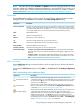
Table 1 Source lookup rules in Add Source dialog
DescriptionComponent
When selected, specifies that the debugger look for source files at their local
compile-time location. This is the default rule for local NonStop projects. If you select
this entry and click OK, the entry you selected is added to the list of source lookup
paths shown in the Source tab.
Local Compile-Time File
Path
When selected, specifies that the debugger look for source files in a given local
directory. If you select this entry and click OK, the Add File System Directory dialog
is displayed (“Add File System Directory dialog” (page 48)).
Local Directory
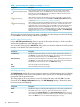
When selected, specifies that the debugger look for source on the local system using
a path derived by substituting part or all of a file’s compile-time path with a
replacement path. If you select this entry and click OK, a new path mapping entry is
added to the list of entries in the Source tab. This new entry does not have any
mappings associated with it. To add path mappings to a path mapping entry, select
the path mapping entry in the list in the Source tab and click Edit.... The Path Mappings
dialog (“Path Mappings dialog” (page 48)) is displayed.
Local Path Mapping
Debug Configurations dialog for NonStop debugging configurations 47