
iTP Secure WebServer System Administrators Guide (Version 7.5+)
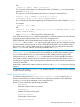
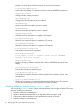

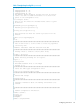
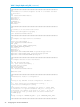
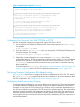
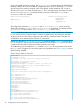
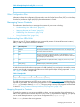
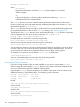

Table 7 Sample httpd.config File (continued)
#
# Custom configuration can be done here.
#
#
################################################################
##
# This does an existential check for a sampleservers.config
# file. If it is there, it will be included in the
# configuration.
#
if { [file exists $root/conf/sampleservers.config] } {
source $root/conf/sampleservers.config
}
################################################################
##
# This does an existential check for a local.config file. If
# it is there, it will be included in the configuration. By
# default,this file is NOT shipped with the product.
#
if { [file exists $root/conf/local.config] } {
source $root/conf/local.config
}
Configuring Your Server for Use With TCP/IPv6 or IP CIP
No new configuration directives are required to support TCP/IPv6 or IP CIP.
1. You must specify a TCP6SAM/CIPSAM process as the transport process in httpd.config.
For example:
Accept -transport /G/ZSAM1
2. If you also use the httpd.stl.config file, you must specify a TCP6SAM/CIPSAM process
for secure transport. For example:
AcceptSecureTransport -transport /G/ZSAM1
3. Optionally, consider adding the new server command, Deletedelay, to the Server
configuration directive. The Server commands control the creation of the PATHMON environment
that the server executes in. Unused links to dynamic servers are returned to PATHMON. The
Deletedelay command specifies the amount of time (in minutes) to wait before returning
these unused links.
For further details on Deletedelay, see “Migration Considerations For TCP/IPv6 and IP CIP
Support” (page 48), and for the Server configuration directive see “Server” (page 247).
The Secure Transport Configuration File (httpd.stl.config)
Table 8 (page 98) shows how to configure the iTP Secure WebServer for SSL or TLS. This sample
file, httpd.stl.config, is supplied with the iTP Secure WebServer. For more information about
SSL/TLS configuration, see “Configuring for Secure Transport” (page 53).
Configuring Global Session Key Caching
To improve caching performance, you can use global session key caching. The current architecture
has multiple instances of Webserver processes running as a Pathway serverclass. Each instance
maintains its own cache of TLS/SSL session keys. However, due to round-robin load balancing of
the iTP Secure WebServer environment, TLS/SSL session key cache hits are rare. This enhancement
provides increased overall TLS/SSL performance by allowing a cache of TLS/SSL session keys to
be shared amongst all instances of the httpd serverclass, thereby maximizing the cache hits and
minimizing the processor and network resources required for establishing TLS/SSL connections to
the NonStop platform.
Configuring Your Server 97