
iTP Secure WebServer System Administrators Guide (Version 7.5+)
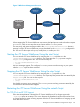
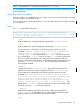
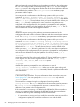
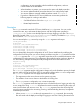
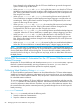

Figure 3 WebServer Management Processes
PATHMON
httpd
config file
Distributor
Process
Generic-CGI
Server
iTP Secure
WebServer
Appl. CGI
Server
When stopping the iTP Secure WebServer environment, the httpd process sends a shutdown request
to PATHMON, which in turn stops the server classes and the PATHMON process.
The start, stop, and restart scripts provided in the /usr/tandem/webserver/conf directory
manage a single iTP Secure WebServer process described by the httpd.config configuration
file. You can use the scripts as they are, modify them, or create your own.
Starting the iTP Secure WebServer Using the start Script
You can start the iTP Secure WebServer by executing the start script that is in the
/usr/tandem/webserver/conf directory. The script starts the httpd process using the
httpd.config configuration file. You can use the script as:
: cd /usr/tandem/webserver/conf
: ./start
No error messages appear. The configured PATHMON process must be running on your system
after the start script has been executed.
Stopping the iTP Secure WebServer Using the stop Script
You can stop the iTP Secure WebServer by executing the stop script that is in the
/usr/tandem/webserver/conf directory. The script stops the process that was started by the
httpd.config file. You can use the script as:
: cd /usr/tandem/webserver/conf
: ./stop
You should not get any error messages. The PATHMON process and any processes started by the
iTP WebServer environment are stopped.
Restarting the iTP Secure WebServer Using the restarth Script
For TCP/IPv6 and IP CIP Support
If the Auto-Accept feature is elected, the iTP Secure WebServer will no longer support the
-restarth option at its startup. This occurs because the Distributor has been removed and can
no longer be used to stage incoming requests while the iTP Secure WebServer is bringing up and
down the HTTPD servers.
Starting the iTP Secure WebServer Using the start Script 83