
iTP Secure WebServer System Administrators Guide (Version 7.5+)


To control server access and privacy, you can:
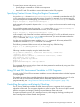
• Specify Region commands to control server responses
• Use the TLS and SSL variables to access information within CGI programs
Specifying Content Access Using the Region Command
You use the Region directive's RequireSecureTransport command to mandate that only TLS
or SSL connections can access particular regions of content. For example, if you must protect all
your secret recipes from eavesdropping, you could use the RequireSecureTransport command:
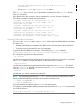
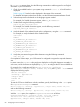
Region /recipes/* { RequireSecureTransport }
In this example, all requests for objects in the /recipes region on the server must be made using
TLS or SSL.
You can further restrict access by using the -auth option of the RequireSecureTransport
command to require that client authentication occurs, as in this example:
Region /recipes/* { RequireSecureTransport -auth }
In this example, only clients that have been authenticated using TLS or SSL are allowed access to
objects in the /recipes/top-secret region on the server. (For more information about the
Region command, See “Region” (page 232).
You also can use CGI environment variables in Region commands. All security-related CGI
variables are available in Region commands. For example:
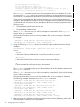
The following command allows access only to clients using keys 1024 bits long:
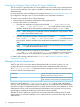
Region /* { if {$HTTPS_KEYSIZE != 1024} {Deny}
}
Following is another example, using the Web client's DN:
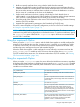
set goodusers {CN=User 1, OU=Persona Certificate, O="RSA Data
Security, Inc.", C=US}
lappend goodusers {CN=User 2, OU=Persona Certificate, O="RSA
Data Security, Inc.", C=US}
RegionSet goodusers $goodusers
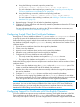
Region /* {
RequireSecureTransport -auth $goodusers
}
This command allows access only to clients who have presented a certificate by using one of the
DNs specified in goodusers.
Using TLS and SSL Environment Variables in CGI Programs
You can use the TLS and SSL environment variables to access information about individual requests
in CGI programs.
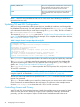
The method to access these variables depends on the programming language you use. For a list
of the TLS and SSL environment variables and for information about how to use them
programmatically, see “Using Common Gateway Interface (CGI) Programs” (page 138).
Controlling Encryption and Integrity Checking
The iTP Secure WebServer enables the Web client and server to negotiate which encryption
algorithm will be used. The encryption algorithm is called a cipher. The choice of cipher controls
both the encryption and integrity checking required between client and server.
Encryption protects the privacy of a message in transit, while integrity checking provides proof
that a message has not been altered during transit.
Specifying Content Access Using the Region Command 75