
iTP Secure WebServer System Administrators Guide (Version 7.5+)

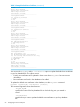

This command deletes from the certificate database all information associated with the specified
DN.
The command arguments have these functions:
-keydb keydb
specifies the name of the key database file in which the key pair you created is
stored.
-delete
specifies that a certificate and key pair should be deleted from the server's key
database file.
-dn 'dn'
specifies the full DN for the new key pair. Enclose this DN with apostrophes (') to
protect it from being interpreted by the shell.
Make sure to include the same field values entered on the CA request form and in
the exact order that the CA specifies. Also, enclose any value containing a comma
with quotation marks (").
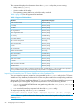
The keyadmin command accepts these characters in the DN field:
A-Z a-z 0-9 (space) ' ( ) + , - . / :=? #
-verbose
specifies that complete information associated with the command string should be
displayed.
Renewing a Certificate
To renew a certificate, perform these steps:
1. Generate certificate request. For more details, see “Creating a Certificate Request” (page 58).
2. Follow the instructions provided by your CA (for example, on their web page) and send the
resulting certificate request (in the file designated by -mkreqor in cert-req.txt) to them
via email for processing. For more details, see “Requesting a Certificate” (page 59).
3. Add certificate from CA. For more details, see “Adding a Certificate to the Key Database
File” (page 59).
4. Update the httpd.stl.config file if the certificate is different from the request.
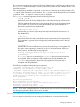
NOTE: Use keyadmin utility with the -list -keydb < keydb> command to view the
information in the keydb file. For more details, see “Adding certificates with DNs that are
different from the key generation DN” (page 59).
5. Restart the iTP WebServer.
The existing key database file renews the certificate by using any of these approaches:
• Use the same (as it was for the existing certificate) Certificate Signing Request (CSR) and
keypair to get a certificate for the same DN with extended validity.
• Generate a different keypair and CSR for the same DN to get a new certificate.
NOTE: If you are using the second approach to renew a certificate, you must delete the old entry
from the key database file. Otherwise, the key database file cannot identify the proper certificate.
Disabling or Enabling a Certificate
To disable a certificate or enable a previously disabled certificate in the key database file, use
keyadmin command.
Managing Certificates 61