
iTP Secure WebServer System Administrators Guide (Version 7.5+)


• Statistics collection through command-line
iTP Secure WebServer provides a command-line utility, statscom, to collect httpd statistics.
This utility is run using the command line and can be run by both administrators and normal
users. For more information, see “Collecting httpd Statistics Using statscom” (page 88).
• PUT, OPTIONS, and TRACE request methods
A browser or Web client (using HTTP/1.1) uses the PUT request method to replace or create
the content at a specified location. The iTP Secure WebServer accepts PUT requests and
enables you to specify a script to perform validation before permitting an update.
A browser or Web client uses the OPTIONS request method to determine the options or
requirements associated with a resource, or the capabilities of a server, without necessarily
retrieving or acting on the resource.
A browser or Web client uses the TRACE method to see the data that is being received at the
other end of the request chain. The data can then be used for testing or diagnostic information.
• Persistent connections
Rather than establish a new TCP/IP connection for each URL (for instance a new connection
to retrieve an embedded graphic) the iTP Secure WebServer allows the establishment of a
persistent connection for a set of related requests; you can set a timeout or specify the maximum
number of requests per connection.
• Chunked-transfer encoding
When a browser or Web client cannot anticipate the length of a request, it can transmit the
data in chunks to the iTP Secure WebServer. The iTP Secure WebServer reassembles the
request and processes it.
The iTP Secure WebServer supports chunked-transfer encoding.
• Content negotiation
When a page is available in multiple representations (for example, if the text is available in
multiple languages, or a file is available in different character sets or compression formats),
the iTP Secure WebServer can select among those representations on the basis of information
transmitted with each request or specified in the iTP Secure WebServer configuration.
iTP Secure WebServer Architecture
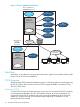
Figure “iTP Secure WebServer Architecture” (page 30) shows the architecture for a conventional
TCP/IP environment. For information about other products, you can use in the iTP Secure WebServer
environment, see “iTP Secure WebServer Encryption” (page 32).
If you use the new TCP/IPv6 or IP CLIM TCP/IP product, the architectural environment changes
slightly. Running with the Auto-Accept feature, an iTP Secure WebServer no longer needs the
Distributor component. The httpd servers assumes the listening in addition to the distributing functions
of the Distributor. The Distributor server class will be completely removed from the PATHWAY
environment. All the necessary process hops will be removed, resulting in improved performance.
iTP Secure WebServer Architecture 29