
iTP Secure WebServer System Administrators Guide (Version 7.5+)
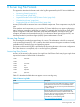
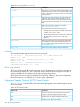
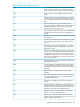
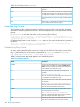
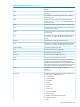
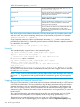
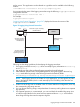
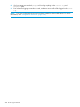

Table 35 Access Log Fields (continued)
DescriptionField
Reports the user name that the user entered (together with
a password) to gain access. If the user did not enter a user
username
name, or did not enter a valid user name, this field is filled
with a hyphen (-).
Reports the time of the request in Universal Coordinated
Time (UTC, also known as Greenwich Mean Time, or
time
GMT). The last component in this field specifies the offset,
in hours and minutes, between the server’s local time and
UTC.
Reports the Web client’s request. For example:
GET /dirsite.gif HTTP/1.0
request
The request field consists of the following items:
• The HTTP method: Typically the method is GET, POST,
or HEAD; in this case, it is GET.
• The URL that is being accessed: In this case, /dirsite.gif.
• The Web client’s protocol version: In this case,
HTTP/1.0.
Reports the HTTP status code returned to the Web client.
200 indicates a normal result (completed without error).
HTTP-status
For a complete list of the other possible status codes, see
Table 36 (page 262).
Reports the number of bytes sent to the Web client.bytes-sent
Example
This example displays typical entries in the access log file:
150.180.13.54 - - [24/Jan/1995:12:27:13 -0500] "GET /dirsite.gif
HTTP/1.0" 200 7114
quinton.jax.org - - [24/Jan/1995:12:27:14 -0500] "GET /
HTTP/1.0" 200 1280
tucano.cv.com - - [24/Jan/1995:12:27:16 -0500] "POST
/dir/search.cgi HTTP/1.0" 200 15691
Error Log Format
The error log file records all request and server errors. The information in this file is structured in
the common log format (CLF). CLF is generally used by Web servers and supports a number of
widely available tools for analyzing server logs and generating reports.
The location of the error log file is specified by the ErrorLog directive in the server configuration
file. If this directive is not explicitly set, no error log file is generated.
Hypertext Transfer Protocol (HTTP) Status Codes
Table 36 (page 262) lists theHTTP status codes that might appear in the extended log file and in
the access log file.
Table 36 HTTP Status Codes
DescriptionStatus Code
Continue. The server received the previous part of the
request, so the client should send the next part.
100
Normal result. The request completed without error.200
Created. A new object was created.201
262 Server Log File Formats