
iTP Secure WebServer System Administrators Guide (Version 7.5+)





A Configuration Directives
This appendix describes the configuration directives you can specify in the server configuration
file (httpd.config). For background information about using the configuration file, see “Configuring
the iTP Secure WebServer” (page 94).
Directives that were supported in earlier releases of the iTP Secure WebServer, and that have been
superseded by new directives are listed in Table 28 (page 198):
Table 28 Directives That Have Been Replaced
Replaced by New Directive(s)Previously Supported Directive
“Accept” (page 198)Port
“Accept” (page 198)
“AcceptSecureTransport” (page 200)
ServerAddress
“Accept” (page 198)
“AcceptSecureTransport” (page 200)
ServerName
“Accept” (page 198)
“AcceptSecureTransport” (page 200)
Transport
Accept
Syntax
Accept -transport transport-name [-address server-addr] [-name server-name] [-port port-num]
Description
Use the Accept directive to configure the iTP Secure WebServer (server-name in the example)
to accept HTTP connections on one or more specified transports and ports.
The Accept directive takes the following arguments:
-transport transport-name
The transport name (transport-name) is a TCP/IP process name in OSS format
(that is, preceded by /G/).
One transport-name is required.
-address server-addr
Use the -address argument to configure the server to accept connections on a
specified address (server-addr). The address you specify can be either a numeric
IP address or a valid name or alias registered with the Domain Name Service
(DNS). If no -address argument is specified, the iTP Secure WebServer accepts
connections on all IP addresses currently valid for the iTP Secure WebServer
machine.
NOTE: If -address option is not specified and hostname is not configured for
the particular transport process then, iTP Secure WebServer throws "Invalid
hostname" error.
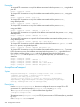
The following examples configure the httpd process to receive messages on any
IPv4 address associated with the process $ZTC0, to use a specified IPv4 or IPv6
address with the process $ZTC1, and to use the IP address bound to the DNS name
www.goblet.com with the process $ZTC2:
-transport /G/ZTC0
-transport /G/ZTC1 -address 120.1.2.13
198 Configuration Directives