
iTP Secure WebServer System Administrators Guide (Version 7.5+)


Defining the Server Class
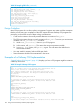
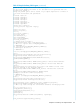
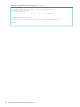
The RLS server class is called rmt.pway. As shown in “RLS Server Class Definition” (page 167),
the httpd.config file provided with the iTP Secure WebServer defines the RLS server class as follows:
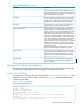
Table 24 RLS Server Class Definition
###############################################################
# Configure Resource Locator attributes
#
set rmt /bin/rmt/rmt.pway
if { [file exists $root$rmt]} {
Filemap $rmt $root$rmt
Server $root$rmt {
CWD $root/bin/rmt
eval $DefaultServerAttributes
Env PASSTHROUGH_CONTENT_LENGTH 50000
}
RmtServer $rmt
}
The first line in the configuration (starting set...) defines the Tcl variable rmt to point to the RLS
object file. Subsequent references to this variable begin with a dollar sign ($).
The next line (starting if...) checks to see whether the object file is present in the root directory of
the iTP Secure WebServer environment; the object file is present if you built and installed it as
described in “Building and Installing the Resource Locator Service (RLS)” (page 169). If the object
file is not present, the RLS server class is not created.
The Filemap directive maps the URL of the object file to the correct location in the OSS file system.
The Server directive defines the server class and its default server attributes. You can override
any default attribute by defining it explicitly. Maxservers must at least equal the number of processes
in the httpd server class. Linkdepth and Maxlinks must each have a value of 1 because
each RLS process is single-threaded.
The PASSTHROUGH_CONTENT_LENGTH variable specifies the maximum length of content that RLS
will fetch from a remote server and send to the Web client. If the length of the requested content
exceeds the value of this variable, or the content length cannot be determined because the request
is for a dynamically mapped resource, RLS does not fetch the content but sends the Web client a
redirect packet identifying the remote server. The value can range from 0 to 2147483647 bytes;
the default and recommended value is 32000 bytes. If you specify a value less than zero, RLS
regards the value to be 0 and sends a redirect packet in all cases. If you specify a value greater
than 2147483647, RLS uses the value 2147483647.
NOTE: If you change the value of PASSTHROUGH_CONTENT_LENGTH, you must re-create the
database and restart the rmt server class as described in “Modifying the Database” (page 169).
The RmtServer directive specifies the URL path name of RLS in relation to the root directory of
the iTP Secure WebServer.
AUTOMATIC_FORM_DECODING will always be off for the server class, even if you specify a value
of ON in your configuration file.
The Web client will display a server error if you replace rmt.pway with your own application or
if you installed rmt.pway incorrectly.
Creating the Database
You can customize the RLS database to specify which Web servers RLS should use interchangeably.
Replicated servers have a common root directory reflected in the database.
To customize the database, edit the file dbload.sqlci in the /bin/rmt directory. When you
run the make utility to build RLS, the data in dbload is loaded into a table called DBACCESS.
Configuring the Resource Locator Service (RLS) 167