
iTP Secure WebServer System Administrators Guide (Version 7.5+)




Program Access Restrictions
You can disable access to CGI programs in certain server areas by using the Deny command in
a Region directive. For example, the directive
Region /~*.cgi* {
Deny
}
denies access to all CGI programs located in user directories, that is, any directory accessed by
a URL beginning with a forward slash followed by a tilde (/~).
Passing CGI Environment Variables
You use environment variables to pass descriptive information about the server and the current
request to a CGI program. Some of these variables are set for all requests; others are set only for
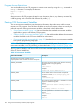
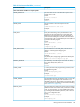
particular requests. Passing environment variables is described in these three tables:
• “Environment Variables” (page 146) lists and describes the standard environment variables
applicable to generic and Pathway CGI programs.
• “Pathway Specific Environment Variables” (page 150) lists and describes additional environment
variables available in the iTP Secure WebServer environment.
• “Environment Variable Access Methods” (page 152) describes how to use environment variables
from specific programming languages.
NOTE: The CGI environment changes on each invocation of CGI_main. To access your
environment variables, use CGI_initialize(), as described under “Design Guidelines” (page 162).
The SSL, session identifier, and Secure HTTP environment variables apply only to secure versions
of the iTP Secure WebServer.
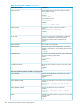
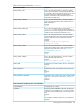
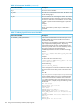
Table 16 Environment Variables
DescriptionEnvironment Variable
The following environment variables are not
request-specific. These variables are set for all requests.
The name and version of the server software answering
the request and running the gateway.
Format:
SERVER_SOFTWARE
name/version
Example:
Tandem iTP Secure WebServer/7.2
The IP address of the virtual host that accepted the
connection. Format: /dir1/dir2/program_name
Example:
SERVER_ADDR
/search/name.cgi
The server host name, DNS alias, or IP address as it would
appear in self-referencing URLs.
Format:
SERVER_NAME
fully-qualified-domain-nameor ip-address
Example:
www.company.com or 199.170.183.2
The CGI specification to which this server complies.
Format:
GATEWAY_INTERFACE
CGI/revision
Example:
CGI/1.1
146 Using Common Gateway Interface (CGI) Programs