
iTP Secure WebServer System Administrators Guide (Version 7.5+)
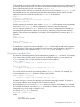

password
is the new user’s password
If you do not supply the user name and password, you will be prompted for them.
Deleting a User From a Password File
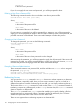
The following command needs to be run to delete a user from a password file:
useradm delete file-name [user-name]
where,
file-name
is the name of the password file
user-name
is the name of the user to be deleted
If a user name is not supplied, you will be prompted for it. Moreover, you will be prompted to
supply your current password for deletion. After successful validation of the current password, the
provided user-name will be deleted. Three unsuccessful attempts will abort this process.
Changing a User's Password
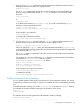
To change the password, you can use the following command:
useradm changepwd file-name
[ user-name]
where,
file-name
is the name of the password file
user-name
is the name of the user whose password is to be changed
After executing this statement, you will be prompted to supply the old password. If the correct old
password is provided, you will be prompted further to supply new password. However, useradm
will abort the password changing process after three unsuccessful attempts.
Example of Password Administration
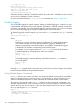
These commands create a new password file, and then add the user tristen who is assigned
the password play-group:
useradm create /usr/tandem/webserver/users
useradm add /usr/tandem/webserver/users tristen play-group
Redirecting Access
You can use the Redirect command in a Region directive to redirect requests to an alternate
URL. This feature is especially useful when you move server contents (in part or in whole) to a
different host machine. Instead of advertising the new URL, you can simply redirect requests to it.
The function of the Redirect command is similar to that of the Filemap command. Instead of
translating a request to a different path, as the Filemap directive does, the Redirect command
directs a request to a different URL.
The Redirect command has a status option that enables you to specify whether a file has
moved temporarily or permanently. When a request is satisfied by redirection, the iTP Secure
WebServer reports this status to the client as an HTTP status code.
There are two approaches to redirecting requests to an alternate URL:
116 Configuring the iTP Secure WebServer