
Site Preparation Guide, Third Edition - HP Integrity cx2600



General Site Preparation Guidelines
Electrical Factors
Chapter 3
26
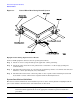
Figure 3-1 Raised Floor Metal Strip Ground System
Equipment Grounding Implementation Details
Connect all HP equipment cabinets to the site ground grid as follows:
Step 1. Attach one end of each ground strap to the applicable cabinet ground lug.
Step 2. Attach the other end to the nearest pedestal base (raised floor) or cable trough ground point
(nonraised floor).
Step 3. Check that the braid contact on each end of the ground strap consists of a terminal and connection
hardware (a 1/4-in. [6.0-mm] bolt, nuts, and washers).
Step 4. Check that the braid contact connection points are free of paint or other insulating material and
treated with a contact enhancement compound (similar to Burndy Penetrox).
System Installation Guidelines
This section contains information about installation practices. Some common pitfalls are highlighted. Both
power cable and data communications cable installations are discussed.
NOTE In domestic installations, the proper receptacles should be installed prior to the arrival of
Hewlett-Packard equipment. Refer to the appropriate installation guide for installation
procedures.