
Site Preparation Guide, Third Edition - HP Integrity cx2600




System Specifications
Environmental Specifications
Chapter 2
17
Cooling
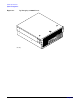
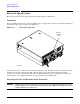
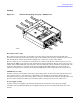
Figure 2-3 Airflow Through hp Integrity cx2600 Server
Overall System Cooling
The cabinet incorporates front to back airflow across the entire chassis. Four 80 mm, dual blade fans,
mounted vertically in the front of the chassis, push air through the CPU, memory, and PCI sections. One 80
mm, dual blade fan and the internal power supply fans cool the lower section of the chassis.
The five 80 mm fans are controlled by circuits of the fan control board. The fan control circuits receive fan
input from the BMC on the system board, and return fan status information. The fan circuit generate power
and the pulse-width-modulated control signals to the fans and monitor the speed indicator signals from each
of the fans. Fan failures are reported via the front panel diagnostic LEDs and in error messages. Room
ambient air temperature is sensed on the front panel LED status board and provided to the system board.
CPU/Memory Cooling
Cooling for the processors (CPUs) and memory is provided by three 80 mm fans mounted in the front of the
server chassis (fans 2, 3, and 4). Fan 2 is controlled by room ambient air temperature and provides air
through the memory section of the chassis. Fans 3 and 4 are controlled by room ambient air temperature and
processor (CPU) temperature. These two fans direct airflow across processor 1 (fan 4) and 2 (fan 3).
Power Supply Cooling
Cooling for the power supplies is provided by the 60 mm fans mounted in each of the power supply
assemblies. Air is pushed through the power supply by the 60 mm fans and exhausted out the rear of the
chassis.
airflow2