
HP Integrity cx2600 Operations and Maintenance Guide

5. Remove the top cover from the chassis. See “Installing the Front Grill and Top Cover”
(page 28).
CAUTION: Observe all ESD safety precautions while performing DIMM installation. Failure
to follow ESD safety precautions can result in damage to the server.
6. Remove the memory airflow guide.
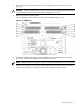
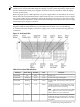
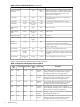
7. Locate the DIMM sockets where you will install the DIMMs (Figure 3-29).
Figure 3-29 DIMM Slots
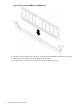
8. Holding the DIMM by its edges, orient the DIMM so the component side is facing the
processors, and insert the DIMM into the appropriate socket.
NOTE: DIMM connectors are keyed so they can only be installed in the correct orientation.
9. Firmly and evenly push on each side of the DIMM until it seats in the socket. The socket
retainer clips return to the upright position when the DIMM is fully inserted.
Installing Memory 51