
HP Integrity cx2600 Operations and Maintenance Guide
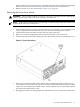
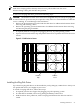
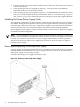
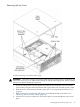
5. Slide the cover toward the rear of the server chassis and lift it straight up.
Installing the Top Cover
To install the top cover, follow these steps:
1. Align each pair of tabs on the left and right sides of the cover with the corresponding slots
in the chassis. Set the cover in place on the chassis.
2. Align the three tabs on the front of the cover with the corresponding apertures at the top
front of the chassis and insert the tabs into the slots.
3. Push the cover forward until it seats on the chassis.
4. Tighten the captive screw to secure the cover in place.
Installing Hot-Swap Chassis Fan Units
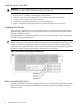
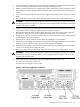
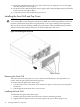
There are five hot-swappable chassis fan units in the HP server. Fan units 1, 2, 3 and 4 are
accessible from the front of the chassis. Fan unit 5 is accessible from the rear of the chassis. Fan
units 1, 2, 3 and 4 are identical and interchangeable.
If a fan failure is total (both rotors), or if the fan has been removed from the chassis for more than
30 seconds, the system logs the event as a critical error. A critical error causes the system LED
to flash red, and requires a reboot to reset the error status. A total fan failure (including removal)
for more than two minutes results in system shutdown. If you are hot-swapping a fan assembly
in response to an error message, and the system is operating normally, hot-swapping the fan in
30 Installing Additional Components