
hp Integrity cx2600 Installation Guide


Troubleshooting
Troubleshooting Using LED Indicators
Chapter 4
53
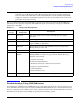
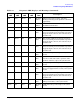
Diag LEDs
(1 thru 4)
-- - Display system error condition (when System
LED is flashing yellow) or fault condition
(when System LED is flashing red). Refer to
Table 4-3 for error code information.
LAN LED Off Off N/A The system is off (no power to LAN circuits) or
hardware failure.
LAN LED Active Steady Green LAN link is established but LAN is inactive.
LAN LED Active Flashing at
rate of LAN
activity
Green LAN is active.
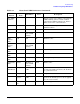
Disk
Activity
LED
Off Off Off Disk not active.
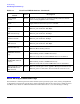
Disk
Activity
LED
Active Flashing at
rate of LAN
activity
Green Disk is active.
Disk Status
LED
Off Off Off Pass through mode.
Disk Status
LED
Off Steady Amber Drive fault.
Disk Status
LED
Active Steady Green Drive operating normally.
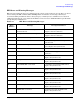
CD Activity
LED
Active Flashing at
rate of LAN
activity
Green Disk is active.
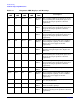
Locator
LED/Button
(Flag) Flashing at
1 Hz
Blue System locator LED may be remotely or
locally activated/deactivated to call attention
to a particular server.
Power LED No power Off Off DC power not available to the server.
Power LED Standby
power
Flashing at
1 Hz
Green DC power is connected to the server, but
power is off. Standby power (3.3V) is applied
to some server circuits.
Power LED Main power
on
Steady Green Power is applied to all server circuits.
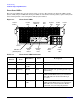
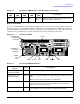
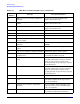
Table 4-2 Front Panel LED Definitions (Continued)
LED/
Button
System
State
Flash Rate Color Description