
Integrated Lights-Out 3 technology




8
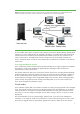
Figure 4: This diagram represents a host server and a remote server console session. The first user in a shared remote console
session becomes the session leader, while up to five others are satellite clients in a peer-to-peer configuration.
For each satellite client request, a pop-up window appears on the session leader’s desktop, identifying the
requester’s user name and DNS name (if available) or IP address. iLO 3 authenticates and authorizes all
console sessions first, and then the session leader decides whether to allow the new connection to the
remote console session. All satellite client sessions terminate when the session leader terminates the
session. The shared remote console lets several administrators collaborate to troubleshoot or maintain the
remote server.
Java Integrated Remote Console
iLO 3 combines the remote console and virtual media functionality into a single Java applet. The updated
look and feel is similar to the Windows IRC applet and takes advantage of ASIC and firmware
enhancements to improve performance.
The Java IRC redirects the host server console to the network client browser, providing full text (standard),
graphical mode video, keyboard, and mouse access to the remote host server (if licensed). It enables you
to view a stalled remote server with blue screen conditions, restart the server without onsite assistance,
observe POST boot messages, and to change BIOS settings when necessary. When installing operating
systems remotely, the graphical remote consoles (if licensed) enable you to view and control the host
server screen throughout the installation process.
Virtual media
iLO 3 embeds a complete USB 2.0 controller to augment any existing storage peripherals in the managed
server. The controller and iLO 3 firmware provide improved support for the simultaneous use of multiple
virtual media devices. iLO 3 delivers virtual CD/DVD performance 3-5 times greater than that of iLO 2.
This means you can now configure and update a server faster, making it easier to use iLO 3 for remote
deployments.
The virtual media device can be a physical floppy, USB key, DVD, or CD drive on the management
workstation, or an image file stored on a local disk drive or network drive. Booting from an iLO 3 virtual
device lets you upgrade the server system ROM, upgrade device drivers, deploy an OS from network